SAF Weather
Server-wide time and weather with a forecast, presets and a staff weather desk.
- Status
- Coming soon
- Version
- 1.0.0
- Resource
- saf-weather
- Frameworks
- Qbox, QBCore, ESX, ND Core, ox_core, standalone
- Dependencies
- None. ox_lib optional for notifications
- Database
- Not needed
- Open files
- config.lua, bridge/, custom/
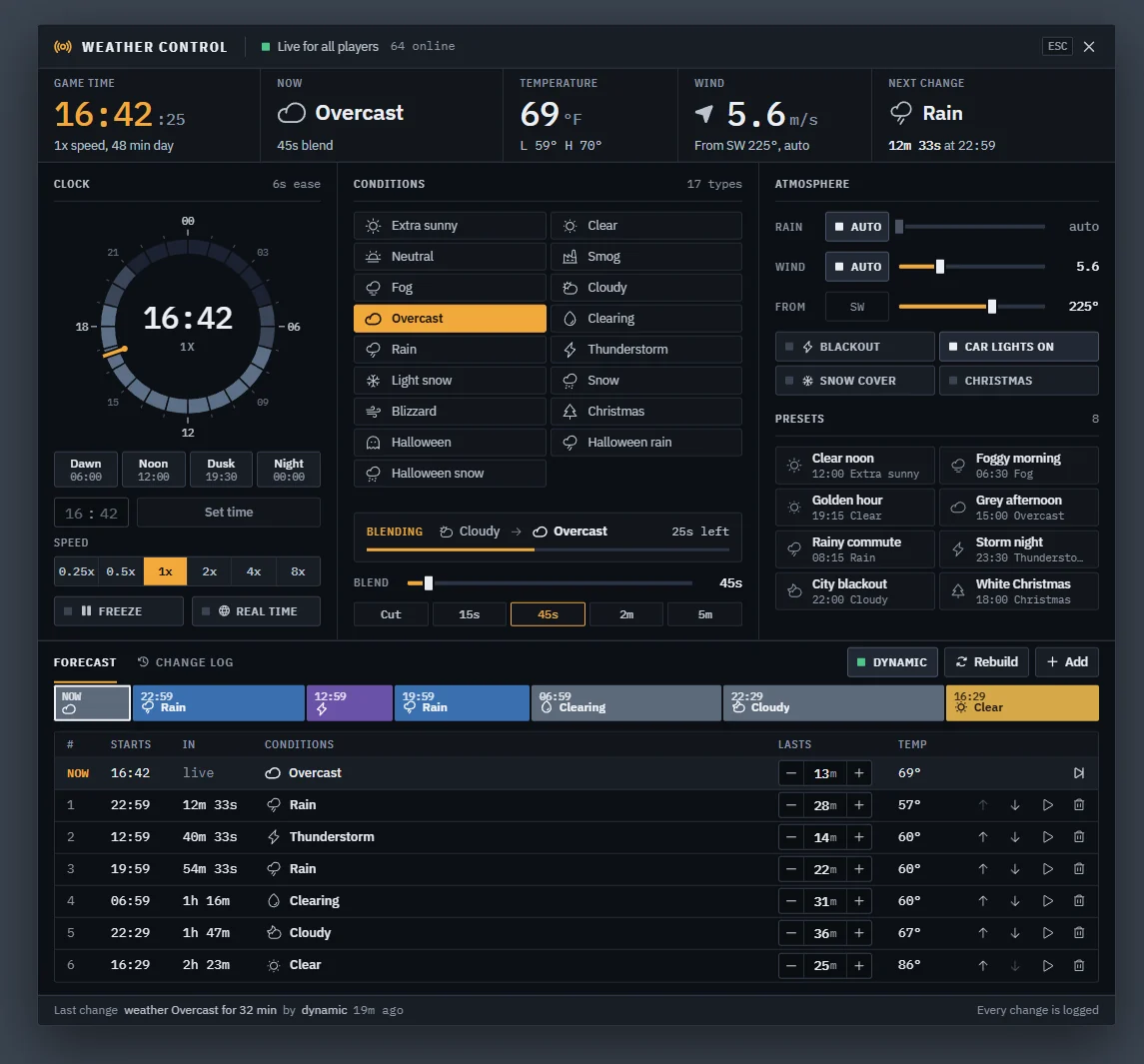
SAF Weather keeps the clock and the sky on the server, so every player sees the same time and weather. Staff
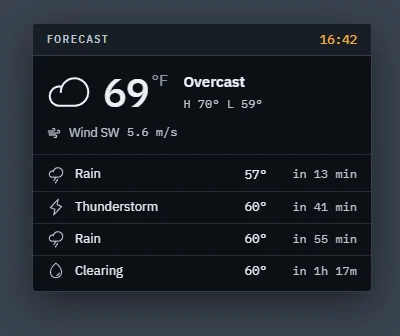
steer it from a control panel laid out like a weather desk, and players check what's coming with /forecast.
What it does
| Part | What it does |
|---|---|
| Sync | Late joiners get the current sky and time the moment they load in. Clients keep the clock themselves and only hear from the server on a change, plus a slow resync |
| Clock | Pick the length of a day, speed it up or slow it down, freeze it, or follow real-world time in your timezone. Time changes run the sky forward over a few seconds instead of snapping |
| Weather | All 17 GTA weather types with smooth blends. Dynamic mode picks the next weather from weighted sequences, so clear skies cloud over before it rains |
| Forecast | The next changes are planned ahead with start times. Staff can edit, reorder, lengthen, skip or replace any of them |
| Atmosphere | Wind speed and direction, rain strength, blackout, snow on the ground with tyre tracks and footprints, and a Christmas mode with a winter cycle |
| Presets | One click for "Storm night", "Foggy morning", "City blackout" and any you add |
| Temperature | Worked out from the weather and the time of day, in F or C |
| Saving | Weather, clock, forecast and settings come back after a restart |
Every change is checked on the server, rate limited and logged with who made it.
The control panel
Staff open it with /weather.
- Readouts across the top: game time, current weather, temperature, wind and the next change.
- Clock: drag on the 24 hour dial (snaps to 5 minutes, hold Shift for 1), use Dawn, Noon, Dusk or Night, or type a time and press Set time. Speed buttons, Freeze and Real time sit underneath.
- Conditions: click a weather to blend to it. The box under the list shows the blend in progress. Blend sets how long the next change takes.
- Atmosphere: rain and wind on auto or by hand, blackout, vehicle lights during a blackout, snow cover and Christmas mode. Presets sit below.
- Forecast: a timeline and a table of the coming changes. Change any entry's weather or length, move it, make it the weather now, or remove it. Add puts a weather at the end, Rebuild plans a fresh forecast, and Dynamic turns the automatic changes on and off. The NOW row sets how long the current weather stays.
- Change log: the last 30 changes and who made them.
Esc closes the panel.
The forecast card
Works with other scripts
Exports, a state bag and events let HUDs and other resources read the clock and the weather. The qb-weathersync events that housing and interior scripts use to pause the weather keep working. See Exports & events.