SAF Scenes
Signs, notes, clues and spray tags on any wall, with a live editor.
- Status
- Released
- Version
- 1.0.0
- Resource
- saf-scenes
- Frameworks
- Qbox, QBCore, ESX, ND Core, ox_core, standalone
- Inventories
- ox_inventory, qb, ps, lj, qs, codem, core, tgiann, jaksam, origen, ESX default or none
- Dependencies
- ox_lib, oxmysql
- Database
- One table, created on first start
- Open files
- config.lua, bridge/, custom/
On this page
SAF Scenes lets players put text in the world: a sign on a door, a note on a desk, a clue at a crime scene or a spray tag on a wall. A live editor shows the scene in the world while you type, so what you see is what everyone else will read.
What it does
| Feature | What players get |
|---|---|
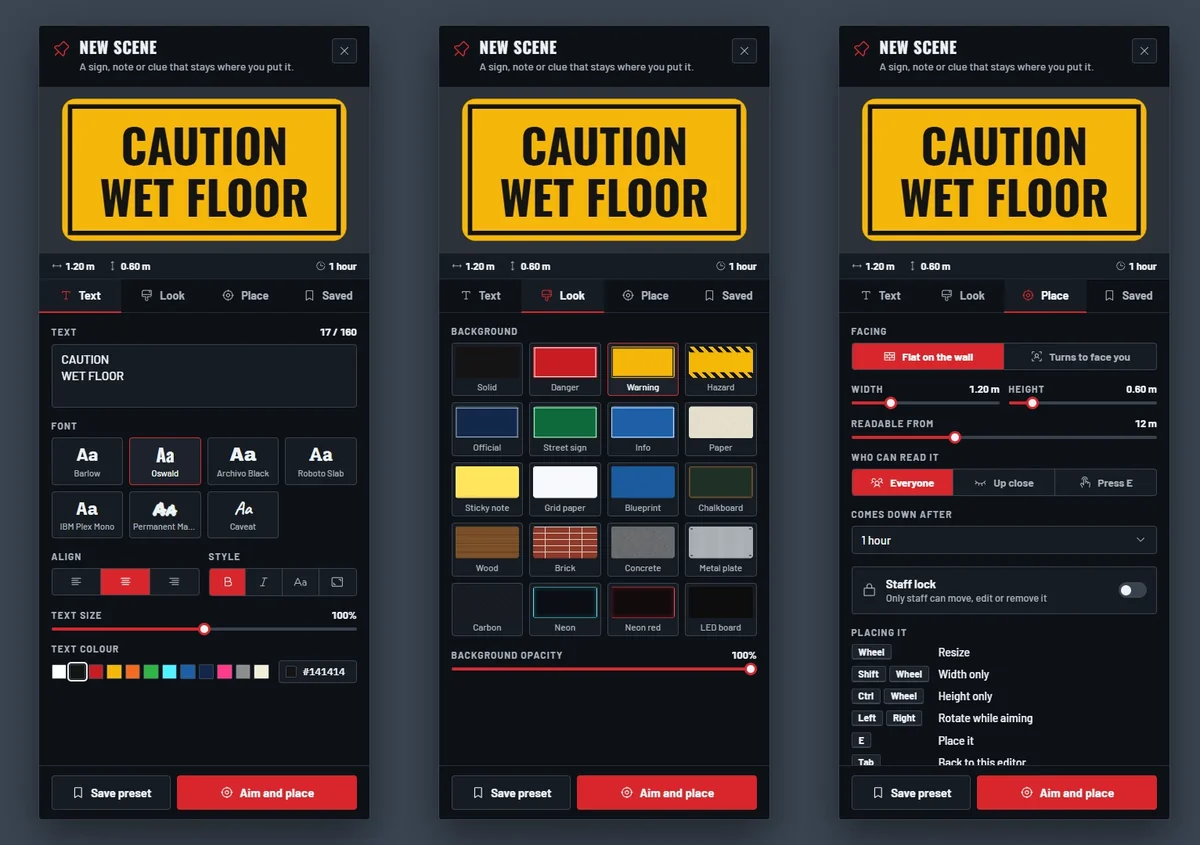
| Live editor | Text shows in the world as you type. 7 fonts, 20 backgrounds, 13 templates, presets and recent scenes |
| Placement | Flat on a wall, or turned to face whoever reads it |
| Who can read it | Everyone, only up close, or only after pressing E |
| Expiry | From 5 minutes to 1 day. Staff can make permanent and locked scenes |
| Spray tags | Placed with a spray can item, wiped off with a cleaning rag |
| Moderation | Word filter, link blocking, a per-player limit, a cooldown and an optional Discord log |
The editor
/scene opens the editor with three tabs. Text has the message, font, alignment, size and colour.
Look has the background, from plain panels to wood, brick and paper. Place sets how it faces, its size,
how far away it can be read and how long it stays.
When it looks right, aim at a surface and place it. Every player sees the same fonts, because they ship with the resource.