SAF Pursuit
Pursuit modes for police vehicles, an in-car unit display and a PIT helper.
- Status
- Coming soon
- Version
- 1.0.0
- Resource
- saf-pursuit
- Frameworks
- Qbox, QBCore, ESX, ND Core, ox_core, standalone
- Dependencies
- None. ox_lib optional for notifications
- Database
- Not needed
- Open files
- config.lua, bridge/, custom/
On this page
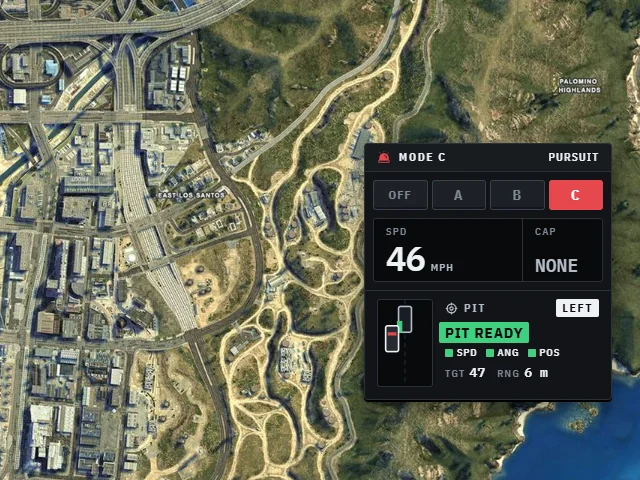
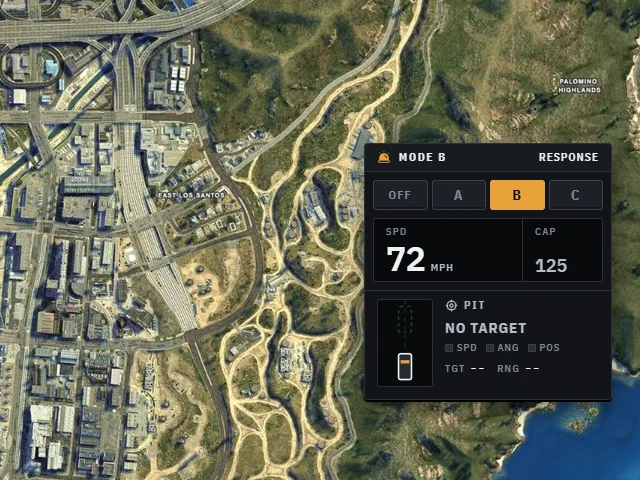
SAF Pursuit gives police units three driving modes on one key. A is patrol, B is response, C is full pursuit. A small display in the car shows the mode, speed and cap, and in pursuit modes it coaches the officer through a PIT.
What it does
| Part | What it does |
|---|---|
| Modes A, B, C | Each sets engine power, a top speed boost, a speed cap, brakes, tyre grip, springs and anti-roll. Change any value or add a mode |
| Per-model tuning | Give a bike or a heavy SUV its own values for any mode |
| Only that car | Changes live on that one vehicle and are put back when the mode goes off, the officer gets out, or someone else takes the car |
| Synced | The mode is on the vehicle's state bag, so every player, your CAD and other scripts can see which units are in pursuit |
| Unit display | A compact panel that looks like in-car equipment: lit mode keys, a speed readout and the cap. Moves to any corner |
| PIT helper | In B and C it picks the car you're closing on, tells you which side to take, and checks speed, angle and contact point against your PIT policy |
| PIT assist | Optional. On a real contact in the window, the target gets a small yaw push so it spins instead of bouncing off |
| Auto off | Drops back to OFF after sitting slow for a while |
Nothing runs per frame unless you are driving a police car with a mode on.
Modes
| Mode | Name | Power | Top speed | Cap |
|---|---|---|---|---|
| A | Patrol | 1.00x | stock | 105 mph |
| B | Response | 1.15x | +6% | 125 mph |
| C | Pursuit | 1.30x | +12% | none |
B and C count as "in pursuit": they turn on the PIT helper and auto off, and IsInPursuit returns true. See
Configuration for every value.
The PIT helper
In B and C the lower half of the display tracks the car ahead of you. It shows LEFT or RIGHT for the side to take, and three checks:
| Check | Green when |
|---|---|
| SPD | You're inside the PIT speed range and matching their speed |
| ANG | You're running parallel to them |
| POS | Your front corner is at their rear quarter, close alongside |
When all three are green it shows PIT READY. Above the PIT speed limit (60 mph by default) it shows the limit in red. The server checks every assisted PIT: police, mode, distance, speed, position and a rate limit. The push is applied by the target's own game.